What is an anomaly and how is its impact calculated?
Learn what an energy anomaly is, how Enersee detects and calculates its impact, and what to do when you spot one.
Written By Arnor Van Leemputten
Last updated 4 months ago
What is an anomaly?
An anomaly is a change in the behaviour of a meter, not just high or low consumption, but a meaningful shift compared to how that meter was behaving before.
This is an important distinction: Enersee does not raise an alarm every time a meter exceeds its expected consumption. Instead, it looks for breaks in the pattern, moments where the meter starts behaving differently than it did in the recent past.
How does Enersee know what "normal" looks like?
Each meter has its own baseline model, trained on 12 months of historical data. During this training period, the model learns how the meter typically behaves given a wide range of variables. Enersee uses over 20 weather variables (temperature, humidity, solar radiation, and more), as well as time-based variables such as time of day, day of week, and time of year. On top of that, any additional variables available at the customer site, such as occupancy rates, can be included in the model as well.
The baseline is essentially a personalised fingerprint for each meter: "this is how this specific meter has behaved over the last year, under similar conditions."
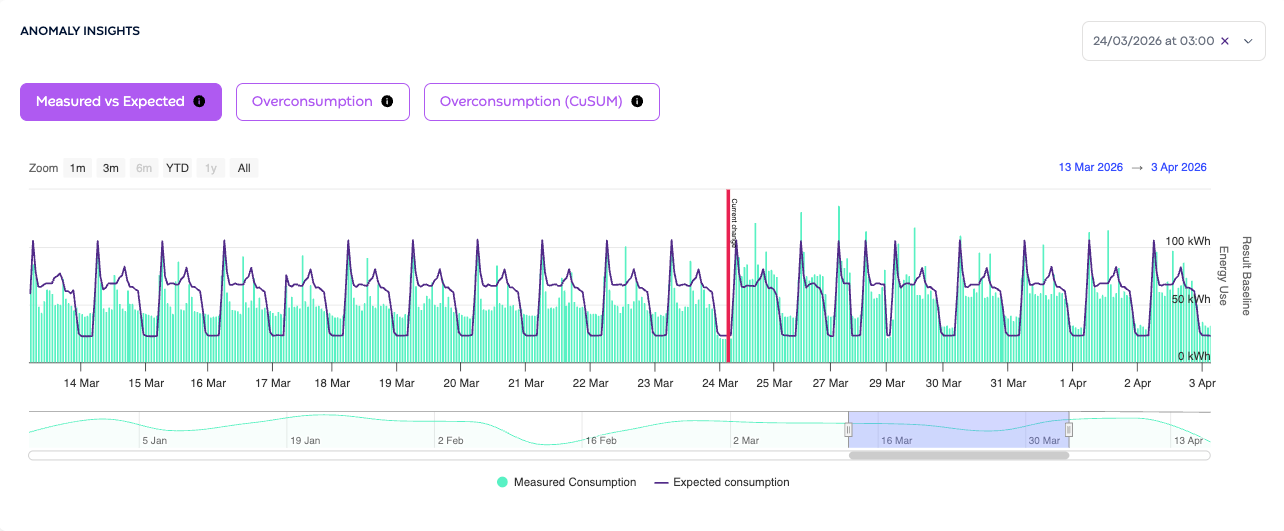
This approach allows Enersee to train baselines in bulk and at scale across large portfolios of meters.
⚠️ This is why historical data matters. Anomaly detection only works reliably once 12 months of historical data has been loaded for a meter. Without it, no baseline can be trained and no anomalies will be flagged.
When does an anomaly get flagged?
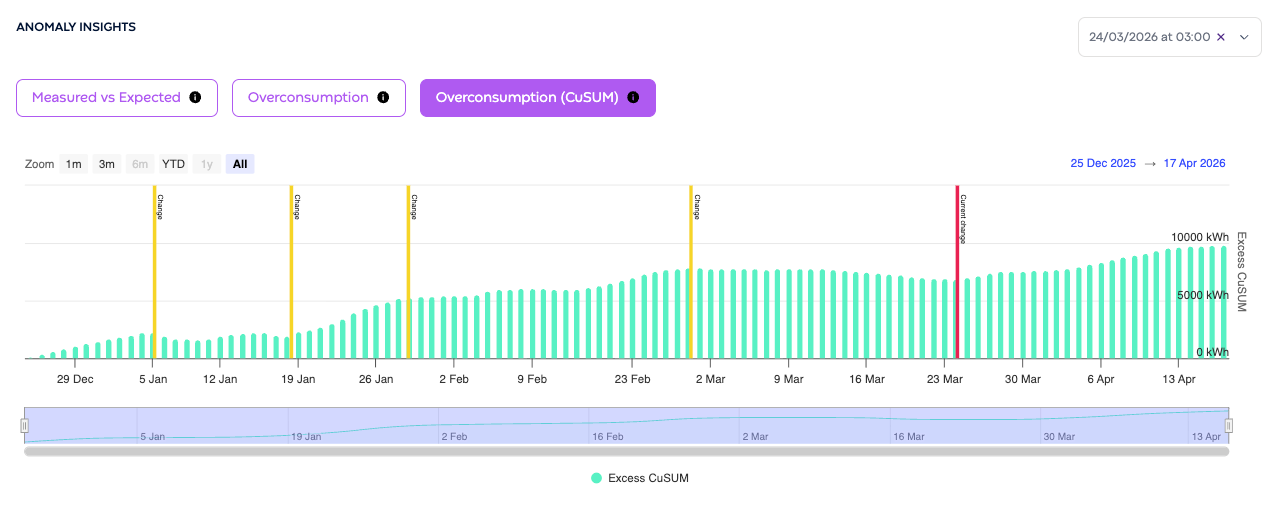
An anomaly is triggered when the meter's behaviour changes, not when it is simply above or below the baseline. Enersee continuously monitors for shifts using a cumulative sum (CUSUM) approach.
The clearest way to understand this is through the cumulative sum graph: a running total of the deviation between actual and baseline consumption. As long as the meter behaves consistently (even if that is consistently above or below baseline), the line trends steadily in one direction. A break or reversal in that trend signals a behavioural change and that is what triggers the anomaly.
How is the impact calculated?
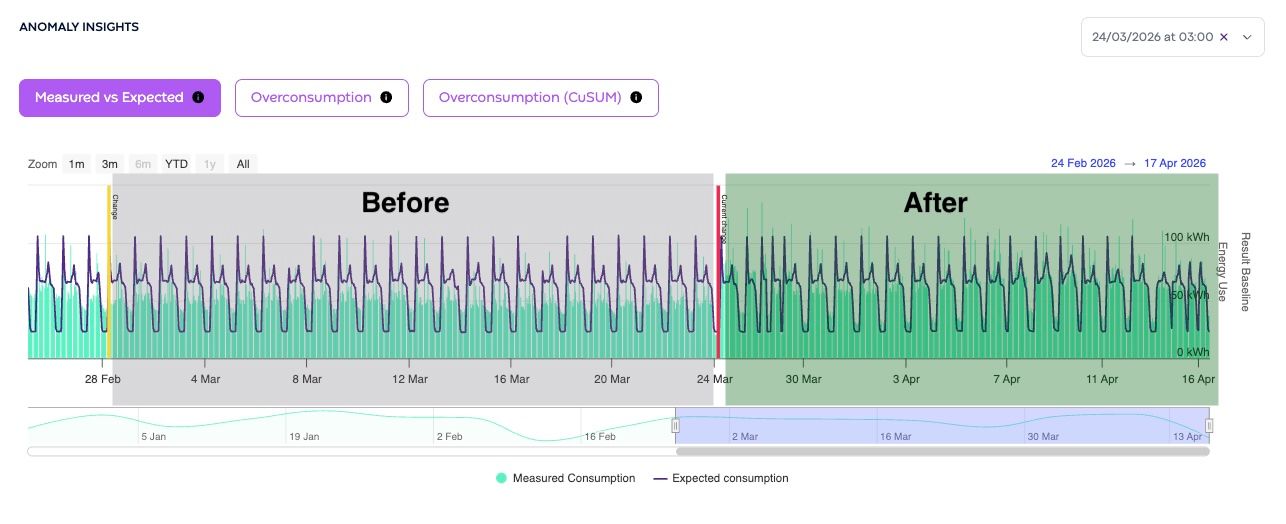
Because anomalies are triggered by changes in behaviour rather than absolute deviations, the impact is always calculated as a before vs after comparison, not simply as "consumption vs baseline."
The before and after periods are defined as follows:
Before: the period between the moment the anomaly was detected and the previous anomaly (or the start of the calculation window if there was no previous anomaly)
After: the period between the moment the anomaly was detected and the next anomaly (or today, if no new anomaly has occurred yet)
Here is an example of how that translates into an impact figure:
Before the anomaly: the meter is consuming 10 kWh/day less than the baseline on average
After the anomaly: the meter is consuming 10 kWh/day more than the baseline on average
Impact: 20 kWh/day, the full shift from one state to the other
This means the impact figure reflects the real operational change, regardless of where the meter sat relative to its baseline before. The cost impact (in euros) is then calculated by multiplying the energy deviation (kWh) by your configured energy cost (euro/kWh).
Real-life examples
🧊 Refrigeration unit losing its night setback
A supermarket's refrigeration system has always consumed less energy between 22:00 and 06:00. The model has learned this pattern. One night, it stops switching to setback mode and consumption stays elevated. Enersee detects the break in pattern and flags an anomaly. Over a week of this going unnoticed, the cumulative cost impact can run into hundreds of euros.
🌡️ HVAC not switching off over the weekend
An office building's HVAC normally drops sharply on Saturday mornings. The baseline knows this. When a long weekend passes with no drop, the change in pattern is detected and an anomaly is raised. By Monday morning, the facility manager already has a cost figure to act on.
⚠️ Meter replacement spike (false positive)
After a meter is replaced or recalibrated, readings can look unusual for a short period, which may look like a behavioural shift to the model. If you have recently had maintenance work on a meter, check that first before escalating.
What should you do when you see an anomaly?
Check the baseline vs consumption graph; this gives you the most detail: you can see exactly when consumption started deviating, by how much, and how it compares to what the model expected. The cumulative sum graph is useful for understanding the overall pattern shift, but the baseline graph is where you will find the most actionable information.
Look for a cause; think about recent changes: maintenance or equipment changes
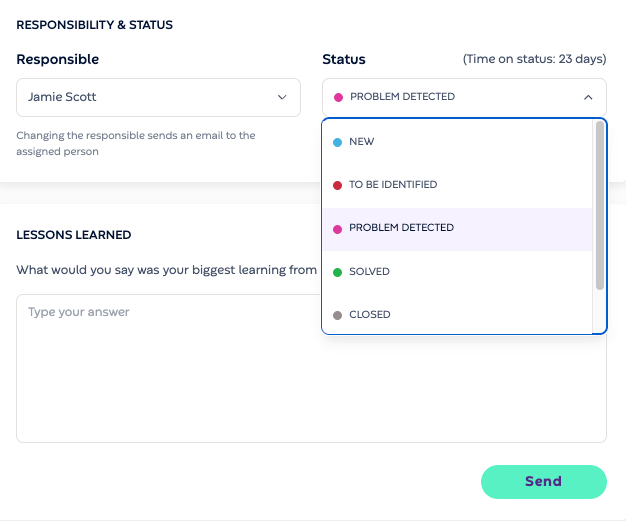
Update the status; move it from New to To Be Identified to Solved so your team stays aligned
Escalate if needed; if the cause is not clear, flag it to your technical team
💡 Tip: Prioritise by impact (in euros), not by volume. A single anomaly running for two weeks at a large site will matter more than ten small ones.