What is a project and how does it measure savings?
Learn what the Projects module is, how it uses a dedicated baseline to measure the impact of energy interventions, and what key concepts like reference period, implementation period and savings target mean.
Written By Arnor Van Leemputten
Last updated 4 months ago
What is a project in Enersee?
A project in Enersee lets you measure the real energy impact of a specific intervention on a meter. Whether you replaced an HVAC unit, installed LED lighting, added insulation, or changed an operational process, a project gives you a before vs after view with a financial outcome attached to it.
Projects answer one question: did this intervention actually save energy, and if so, how much?
Why the Projects module matters at scale
The real power of the Projects module is not just tracking a single intervention. It is what happens when you run initiatives across your entire portfolio.
Imagine rolling out an HVAC retrofit across 100 buildings. Entering all 100 projects takes about a day. From that point, all tracking, benchmarking, and reporting flows out automatically. You get a live view of which buildings are hitting their savings targets, which are underperforming, and what the cumulative financial impact is across the portfolio, without any manual number crunching.
This makes it practical to run large-scale programmes, compare results across sites, and report on outcomes in a way that would otherwise take weeks of spreadsheet work.
How does it work?
Each project gets its own baseline model, trained specifically on the reference period you define. This works the same way as Enersee's anomaly detection baseline but scoped to a single intervention: the model learns what "normal" looked like for that meter before the intervention, and then tracks what actually happens after.
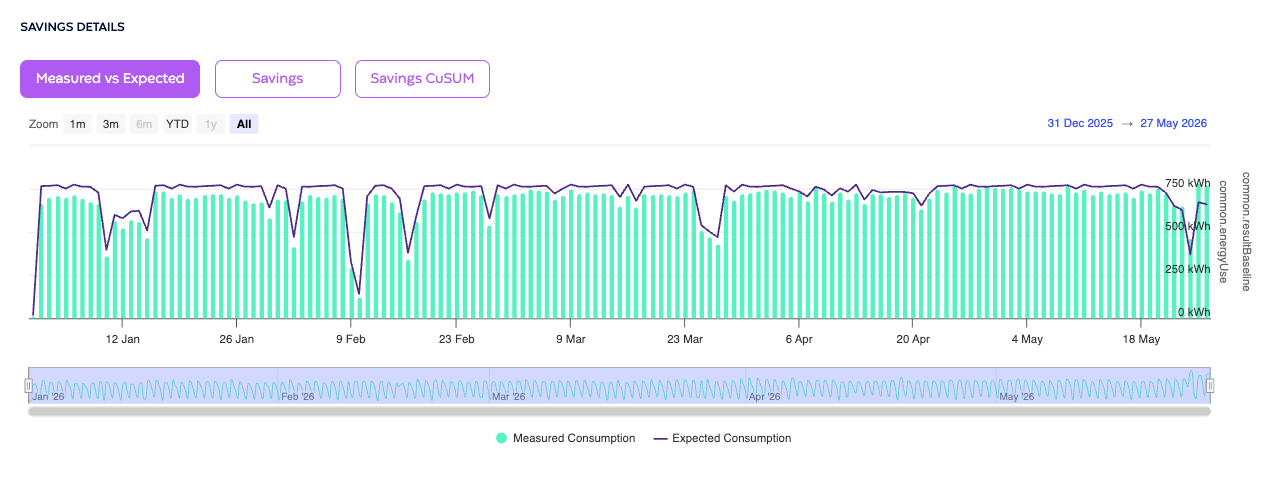
The result is a continuous savings curve showing the difference between what the meter would have consumed (based on the reference period) and what it actually consumed after the intervention, corrected for weather and other variables.
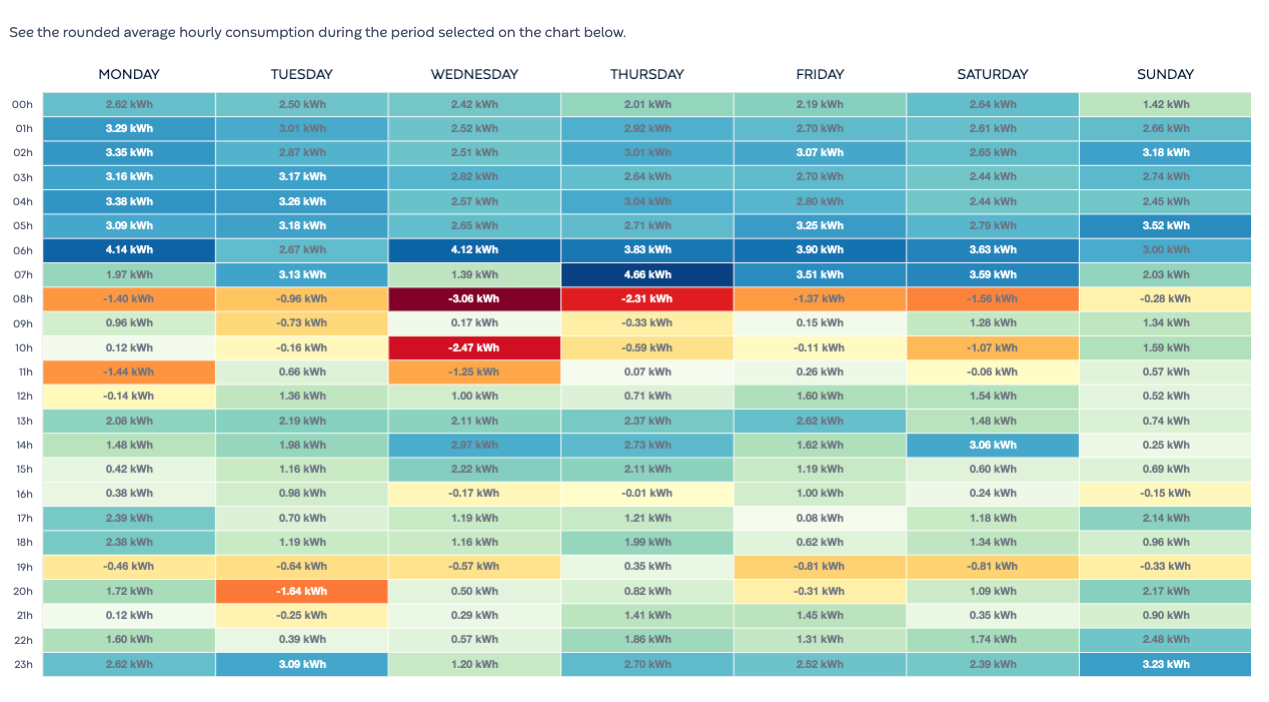
A useful way to explore the underlying consumption patterns is the heatmap view. This breaks down average hourly consumption by day of the week across the selected period, making it easy to spot structural patterns: which hours consistently consume most, whether weekends behave differently from weekdays, and where the largest deviations from the baseline tend to cluster. For a project tracking an HVAC intervention, for example, the heatmap will quickly show whether overnight or early-morning consumption has shifted after the intervention was completed.
Key concepts
Reference period
The training window for the project baseline. It should cover normal, pre-intervention behaviour for the selected meter. A minimum of 9 months is required. A full year is ideal as it captures all seasonal patterns. The longer and more stable this period, the more accurate the savings measurement.
⚠️ The reference period is the most critical input. A period with data quality issues, abnormal occupancy, or meter replacements will degrade the baseline and make savings harder to measure accurately.
Implementation period
The window during which the actual work is taking place, such as installation or construction. Enersee excludes this period from tracking because consumption on a building site is not representative of normal operation. No savings or losses are attributed during this window.
Tracking period
An optional period for reporting purposes. It does not affect the calculation but lets you scope results to a specific timeframe, for example to align with a reporting cycle or a contractual savings commitment.
Savings target
A percentage target you set when creating the project. Visible in the project overview so you can see at a glance whether each project is on track. Does not affect the calculation.
Investment cost
The total cost of the intervention. Enersee uses this together with the realised savings to calculate financial metrics such as simple payback time and ROI.
Category
A label to classify the type of intervention, for example lighting, HVAC, or building envelope. Makes it easier to filter, group, and benchmark projects across your portfolio.
What can you do with a project?
Prove that a specific intervention delivered real, weather-corrected energy savings
Track progress against a savings target over time
Calculate payback period and ROI based on actual realised savings
Benchmark results across sites and intervention types at portfolio scale
Report on project outcomes to internal stakeholders or auditors with no manual effort
💡 Tip: Choose the meter that is most directly impacted by the intervention. Using a main site meter when the project only affects a specific subsystem will dilute the signal and make savings harder to attribute.